PrintedWaste and OpenNOW
OpenNOW can automatically pick the best GeForce NOW region based on queue and ping using live PrintedWaste data.
PrintedWaste now integrates directly with OpenNOW, a third-party open-source GeForce NOW client focused on customization and better control. If you use the free tier, this integration helps you quickly find regions that balance both queue length and connection quality.
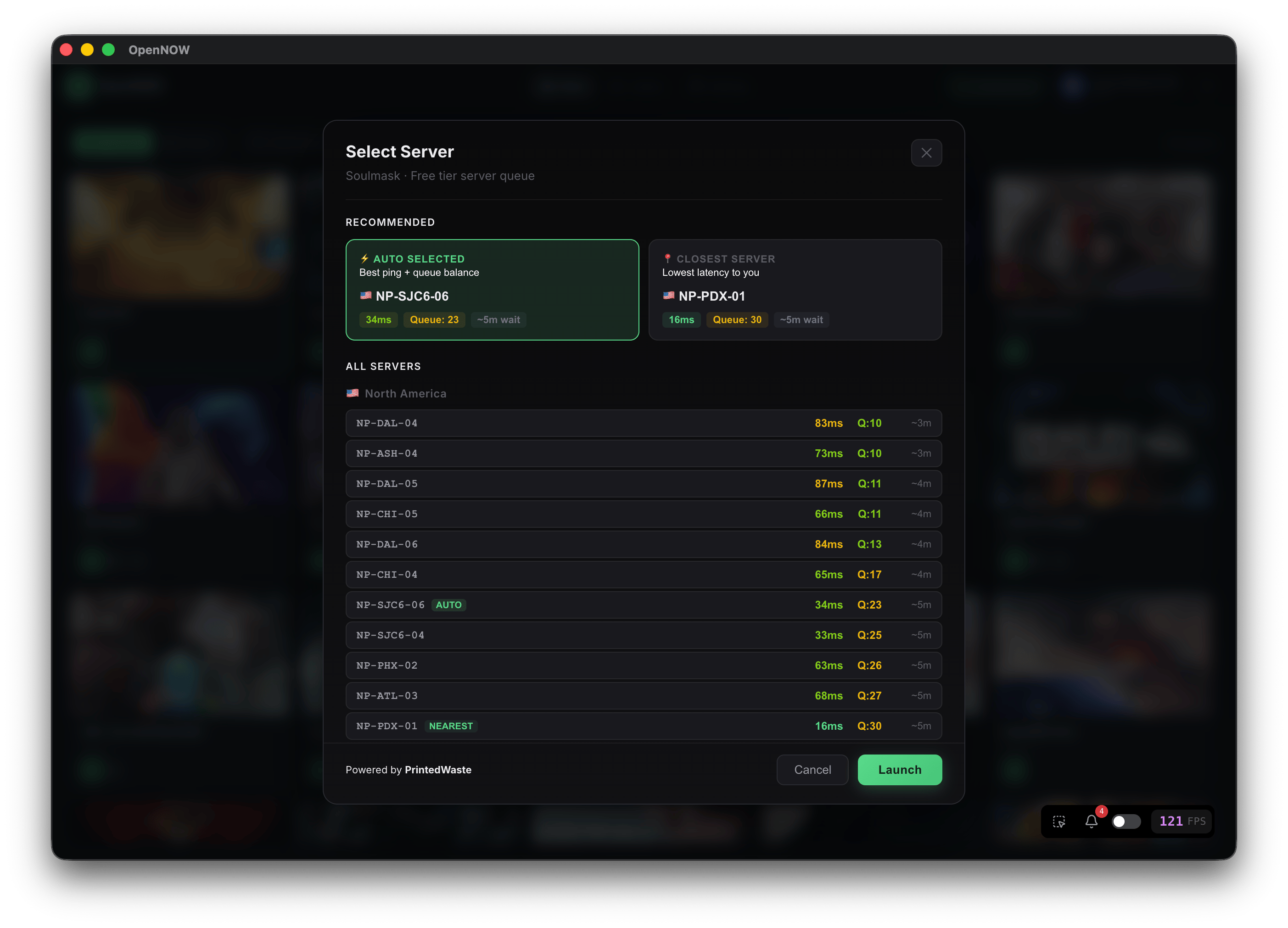
What this gives you
- Live queue visibility powered by PrintedWaste data
- Smarter region selection in OpenNOW to avoid long wait times
- Better chance of finding a fast queue without sacrificing ping
Quick setup
- Install OpenNOW from the official repository.
- Open server or queue settings inside OpenNOW.
- Ensure you are using a free NVIDIA account.
- Start a game and let OpenNOW pick the best available option.
Tip: if your selected region suddenly gets crowded, refresh and let OpenNOW re-evaluate nearby regions. Queue conditions can change quickly during peak hours.
You can join our Discord server to get more help.
We use cookies
We use cookies to ensure you get the best experience on our website. For more information on how we use cookies, please see our cookie policy.
By clicking "Accept", you agree to our use of cookies.
Learn more.